Quote:admin
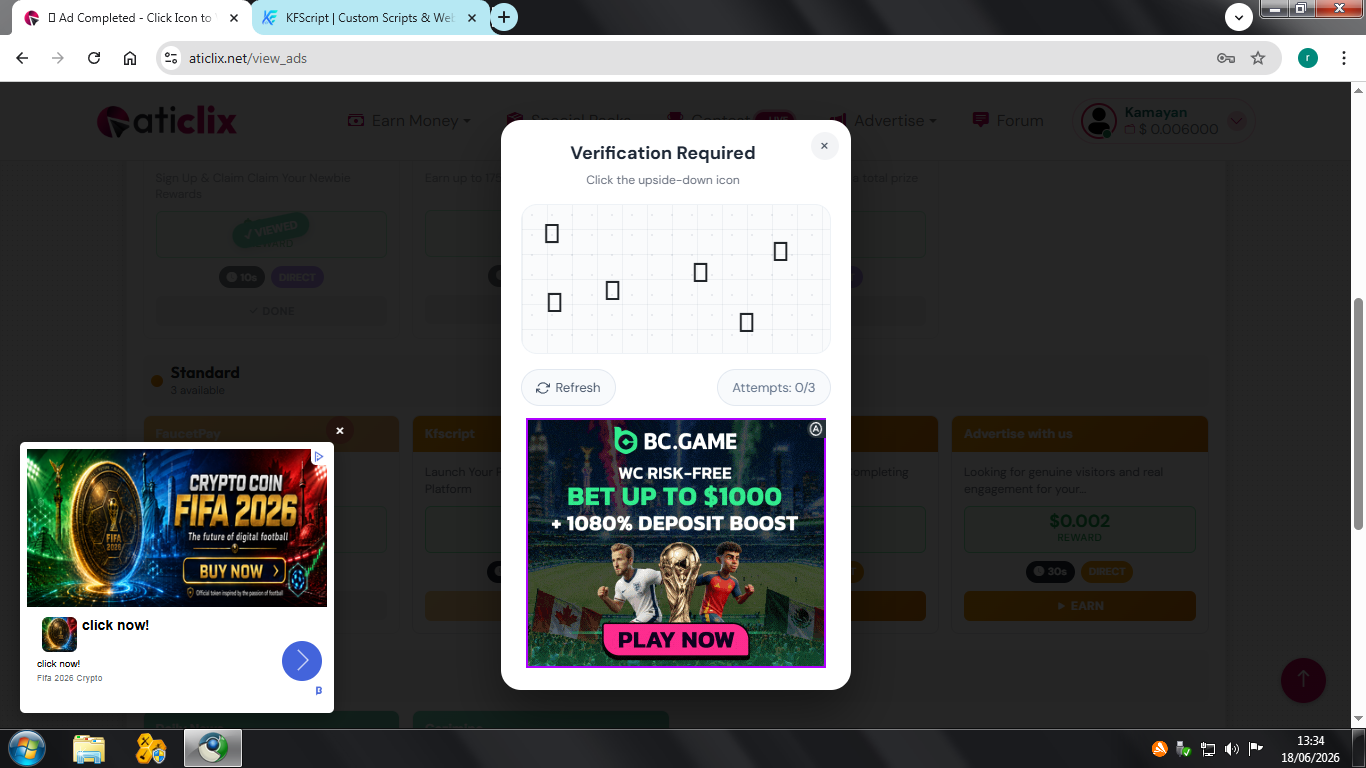
[quote=Kamayan]The "upside-down icon" captcha always displays only small blank boxes without displaying the icon image. I've tried clearing the cache, cookies, history, and not using any Chrome extensions, but the captcha icon is still blank.
Is it really set up that way to click the blank boxes based on a random guess limited to 3 wrong attempts?
Hi,
We identified the issue — it was related to emoji font rendering on certain devices/browsers, which caused the captcha icons to appear as blank boxes instead of showing the images.
We've applied a fix on our end. Could you please:
1. Clear your browser cache (or do a hard refresh: Ctrl+Shift+R)
2. Try the captcha again
3. Let us know if the icons are now visible
4. If possible, please share a screenshot of the captcha box
5. Also let us know which device and browser you're using (e.g. Android/iOS/Windows, Chrome/Safari/Firefox, and version if possible)
This will help us confirm the fix is working properly on your end. Thanks for your patience!
Regards
ATiGROUP
=======
The case is still the same.
I use the Supermium Version 138.0.7204.298 (Official Build) browser (32-bit) to replace Chrome functions on Windows 7 32-bit.